




Color: Black+Blue
Brand: havit
Material: Acrylonitrile Butadiene Styrene ABS
Item Weight: 1.54 Pounds
Product Dimensions: 14.96″L x 11.02″W x 1.18″H


laptop cooling pad
laptop cooling pad
laptop cooling pad
Number of Fans
3
Number of Fans
6
Number of Fans
8
Adjustable Height Levels
2
Adjustable Height Levels
6
Adjustable Height Levels
6
Compatibility
15.6″-17″ Laptop
Compatibility
13″-17″ Laptop
Compatibility
12″-15.6″ Laptop
Charging Cable Type
USB 2.0, USB-A to USB-A
Charging Cable Type
USB 2.0, USB-A to USB-A
Charging Cable Type
USB 2.0, USB-A to USB-A
Cooling Pad Size
14.9″ x 11″ x1.2″
Cooling Pad Size
16.5″ x 11.06″ x1.2″
Cooling Pad Size
14.7″ x 11.18″ x1.2″


This is a modal window.


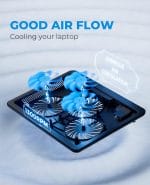
The LED indicator light locating near the on/off switch and those coming with three fans allows you to easily know the working status of the laptop cooling pad, especially at night.
Provides extra USB ports to allow you plug extend devices like mouse, keyboard, headset stand. Simply turn the laptop cooler pad on/ off by the power switch.
Havit laptop cooler fan gives your laptop and yourself a better gaming or typing environment and get your work done faster.
Havit laptop cooler is quiet enough to ignore its existence while working.
Slim, portable, and light weight allowing you to protect your investment wherever you go.
Suitable for using with different devices from router, laptop, PS4/ PS5, tablet and more.

Where can I use this laptop cooling pad?
What type of USB cable can this laptop cooler use?
Do the fans blow air up into the base of the laptop?
Can I turn the lights off?
Can the speed of cooling fans be adjustable?
Where can I use this laptop cooling pad?
We suggest you use this laptop cooling fan on a table/ desk, the bottom of the laptop cooler should be lifted off the surface. If you block the bottom of it, it will not blow upward
What type of USB cable can this laptop cooler use?
It uses a USB-A to USB-A cable. All commercially available USB-A to USB-A cables are compatible with this laptop cooling pad.
Do the fans blow air up into the base of the laptop?
Yes, the air from this cooling pad blow upwards. But please be noted that: To actively cool your laptop, you must have its bottom partially or fully unrestricted.
Can I turn the lights off?
No, unless you turn off the whole laptop cooling pad. There is only one power switch to control the laptop cooler but no separate power switch to control the lights and fans.
Can the speed of cooling fans be adjustable?
No, there is only a power switch to turn on/ off the cooling pad, the speed of fans is default setting.


Reviews
There are no reviews yet